AWS Shared Responsibility: A Visual Guide for Overwhelmed Beginners
So your AWS account got hacked last night. Or maybe it was your coworker’s. Or that startup you read about that suddenly owed $50,000 for services they never used.
Scary, right? The AWS shared responsibility model is like that awkward roommate agreement nobody reads until something goes terribly wrong. Who’s supposed to clean the digital kitchen when there’s a security mess?
I’ve watched dozens of overwhelmed cloud beginners struggle with understanding AWS security boundaries. One day they’re launching their first EC2 instance, the next they’re panicking about compliance requirements they didn’t know existed.
This visual guide breaks down exactly what AWS handles and what falls squarely on your shoulders. No jargon, no corporate-speak.
But first, let’s talk about the biggest misconception that gets even experienced developers into trouble…
Understanding AWS Shared Responsibility at a Glance
A. What is the AWS Shared Responsibility Model?
Think of the AWS Shared Responsibility Model as a simple agreement between you and AWS about who takes care of what in the cloud. It’s like when you rent an apartment – the landlord handles the building structure, while you’re in charge of what goes on inside your unit.
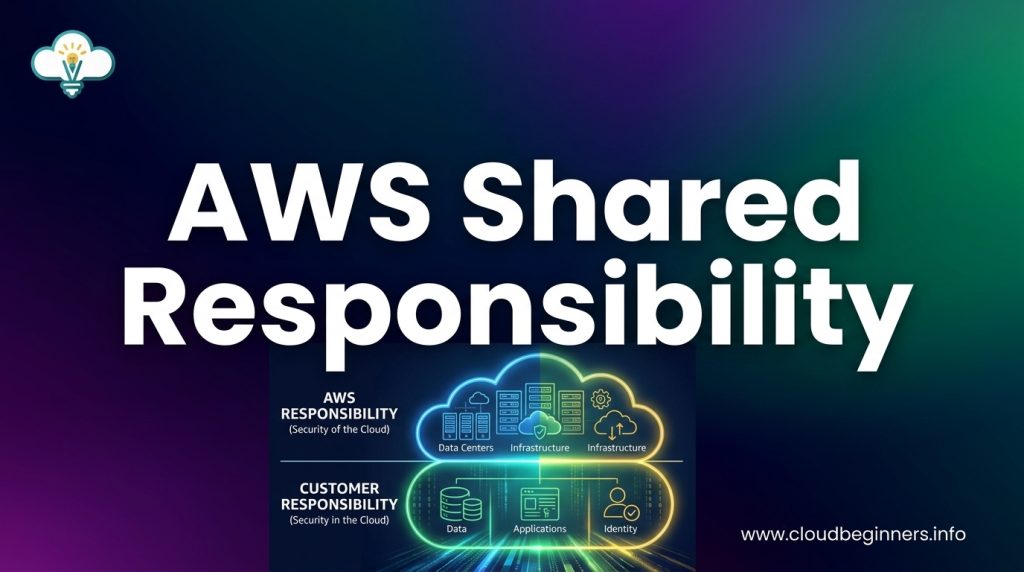
In this setup, AWS manages the security OF the cloud (the infrastructure), while you’re responsible for security IN the cloud (your data and applications).
No need to overcomplicate it. AWS takes care of the heavy lifting – all those data centers, physical servers, and network infrastructure that would otherwise cost you millions to build and maintain.
B. Why Every AWS Beginner Needs to Know This
Jumping into AWS without understanding shared responsibility is like driving without knowing traffic rules. You’ll crash eventually.
When things go wrong (and at some point, they will), you need to know who to call. Is it an AWS issue or something on your end? This knowledge saves you countless hours of frustration and potential security disasters.
Plus, your boss will eventually ask about security in the cloud. Having a clear answer ready makes you look like the competent professional you are.
C. The Simple Dividing Line: AWS vs. Customer Responsibilities
Here’s what the division actually looks like in practice:
| AWS Handles | You Handle |
|---|---|
| Physical security of data centers | Your data |
| Hardware infrastructure | User access management |
| Network infrastructure | Firewall configurations |
| Virtualization layer | Operating system patches |
| Host operating system | Application security |
| Storage system availability | Data encryption |
The pattern? AWS handles everything you can’t physically touch. You manage everything you can configure, upload, or control through their console or APIs.
This isn’t AWS trying to dodge responsibility – it’s actually empowering. You keep control over the security decisions that matter most to your specific business needs.
AWS Responsibilities Demystified
A. Physical Security and Infrastructure
Ever wondered who’s keeping those massive AWS data centers safe? It’s all on AWS. They handle everything from hiring security guards to installing surveillance systems and controlling who can physically access their facilities.
Think about it – you’ll never need to worry about someone breaking into a server room and stealing your data. AWS takes care of:
- 24/7 security personnel
- Biometric access controls
- Video surveillance
- Multiple perimeter layers
- Environmental protections against fire, floods, and power outages
AWS data centers are built to withstand natural disasters and physical attacks. They’re located in nondescript buildings without AWS branding, and their exact locations aren’t publicly disclosed. Pretty sneaky, right?
B. Host Operating Systems and Virtualization
AWS manages all the underlying tech that makes cloud computing possible. They handle:
- Patching and securing the hypervisor
- Implementing isolation between virtual machines
- Maintaining the physical servers
- Updating host operating systems
The hypervisor is the magic that lets multiple customers run their workloads on the same physical hardware without seeing each other’s data. AWS ensures this separation stays secure and reliable.
You don’t need to worry about the server hardware failing or the virtualization layer having security flaws. That’s AWS’s job, not yours.
C. Network Infrastructure Protection
The complex network that connects everything in AWS? Yeah, they handle all of that too. This includes:
- Firewalls and edge routers
- DDoS protection
- Traffic filtering
- Network segmentation
- Transmission encryption
AWS constantly monitors network traffic for suspicious patterns and automatically blocks potential attacks. Their global infrastructure is designed to absorb and disperse huge volumes of traffic during DDoS attacks.
You’ll never need to physically plug in a network cable or configure a physical router. AWS has built a secure, resilient network infrastructure that scales automatically with your needs.
D. Service-Specific Security Features
Each AWS service comes with built-in security features that AWS maintains:
- Data encryption for storage services like S3 and EBS
- Network isolation for VPC and subnet configurations
- Authentication mechanisms for IAM and Cognito
- Monitoring capabilities through CloudTrail and CloudWatch
AWS continuously updates these services to address new threats and vulnerabilities without you needing to take action. For example, when a new encryption standard becomes available, AWS often implements it automatically.
Your job is to configure these security features correctly for your specific needs, but AWS ensures they’re available, functioning properly, and up-to-date with current security standards.
Your Customer Responsibilities Explained
A. Data Encryption and Protection
You’re responsible for safeguarding your own data in AWS. Think of AWS as providing the safe, but you need to lock it properly. This means:
- Encrypting your data both at rest (stored) and in transit (moving)
- Setting up AWS KMS (Key Management Service) to handle your encryption keys
- Deciding which encryption options work best for your specific workloads
- Creating regular backups of your critical data
AWS gives you plenty of tools like S3 server-side encryption and EBS volume encryption, but you’ve got to actually turn them on and configure them correctly. It’s like having an awesome home security system that doesn’t work if you never set it up.
B. Identity and Access Management
Your AWS account is like a digital kingdom, and you’re in charge of who gets the keys. Your responsibilities include:
- Creating and managing user accounts with proper permissions
- Implementing strong password policies
- Setting up multi-factor authentication
- Following the principle of least privilege (giving users only what they need)
- Regularly reviewing access logs and permissions
A shocking number of cloud breaches happen because someone left an admin account wide open or gave too much access to the wrong people. Don’t be that person.
C. Operating System Configuration and Updates
AWS provides the virtual machines, but you’re responsible for what runs on them. This includes:
- Patching and updating your operating systems regularly
- Hardening your OS configurations
- Installing and maintaining security agents
- Managing firewall rules at the OS level
- Removing unnecessary services and features
Think of it this way: AWS built the apartment building, but you need to install your own deadbolts and not leave your windows open.
D. Network Traffic Protection
Your cloud network is your responsibility to secure. This means:
- Configuring security groups and network ACLs properly
- Setting up VPC flow logs to monitor traffic
- Implementing VPN connections for secure remote access
- Using private subnets for sensitive workloads
- Monitoring for suspicious traffic patterns
AWS gives you the network infrastructure, but you’re the one who decides what traffic goes where. It’s crucial you understand how traffic flows through your environment and block anything suspicious.
E. Your Applications and Code
The applications you build and deploy in AWS are 100% your responsibility. This includes:
- Securing your application code against vulnerabilities
- Implementing proper error handling
- Setting up logging and monitoring
- Testing for security flaws before deployment
- Maintaining secure development practices
Even if AWS is perfectly secure, a vulnerable application you deploy can compromise your entire environment. Your code is your responsibility – AWS can’t magically fix security bugs you introduce.
Visual Breakdown of Responsibilities by Service Type
A. IaaS: Maximum Customer Control
With Infrastructure as a Service (IaaS), you’re essentially renting bare-bones computing resources while maintaining significant control. Think of EC2 instances, S3 buckets, or VPCs – you’re responsible for almost everything that runs on these services.
Your responsibilities include:
- Operating system configuration and patches
- Application installation and updates
- Security groups and firewall rules
- Data encryption
- Identity and access management for your resources
- All the code you deploy
AWS handles only the physical hardware, networking infrastructure, and virtualization layer. You’re on the hook for pretty much everything else.
B. PaaS: Shared Management
Platform as a Service (PaaS) offerings like AWS Elastic Beanstalk, Lambda, and RDS split responsibilities more evenly. You focus on your application code and data while AWS manages the underlying platform.
In this scenario:
- You manage: application code, user access, your data
- AWS manages: OS patches, runtime environment, platform updates, infrastructure
PaaS is the middle ground where you don’t need to worry about servers or runtime environments but still control what matters most – your application and how it behaves.
C. SaaS: Minimum Customer Responsibility
With Software as a Service (SaaS), you’re using a fully-developed application that AWS maintains. Services like Amazon WorkMail or AWS Chime put most responsibilities on AWS’s plate.
Your limited responsibilities include:
- Managing user access
- Protecting account credentials
- Configuring application settings
- Managing your data within the application
AWS handles everything else – updates, infrastructure, application code, security patches, and availability.
D. How to Remember Which is Which
A simple trick to remember these models is to think about pizza:
- IaaS is like making pizza from scratch at home – you control every ingredient but do all the work
- PaaS is like getting pizza delivery and baking it yourself – some prep is done for you
- SaaS is like ordering from a restaurant – everything’s prepared, you just enjoy the meal
The more control you have, the more security responsibilities fall on your shoulders. As you move from IaaS to SaaS, your burden lightens while AWS takes on more of the heavy lifting.
Common Beginner Mistakes to Avoid
A. Assuming AWS Handles Everything
The biggest trap you’ll fall into as an AWS newbie? Thinking AWS has your back for everything. Nope. Not even close.
AWS only handles the security OF the cloud – the hardware, data centers, and network. Your data? Your applications? Your user access? That’s all on you.
Many beginners upload sensitive data to S3 buckets with default settings, then are shocked when they discover these buckets are potentially accessible to the world. AWS gives you the bucket, but you need to lock it.
Think of it like renting an apartment. The landlord (AWS) maintains the building structure and common areas, but you’re responsible for locking your door and safeguarding your belongings.
B. Overlooking Critical Security Settings
AWS gives you powerful security tools, but they’re useless if you don’t turn them on. Too many beginners skip these critical settings:
- Identity and Access Management (IAM): Using the root account for everything instead of creating specific user roles
- MFA: Not enabling multi-factor authentication
- Default Security Groups: Never updating the default settings
- CloudTrail: Failing to enable logging and monitoring
- Encryption: Not encrypting sensitive data at rest and in transit
These aren’t “nice-to-haves” – they’re your basic security foundation. Missing just one can leave your entire infrastructure vulnerable.
C. Misunderstanding Service-Specific Responsibilities
Each AWS service has its own security split, and this trips up almost everyone at first.
For example, with EC2, you’re responsible for the operating system, applications, and data. But with managed services like RDS, AWS handles more of the operational burden – though you’re still on the hook for access management and data protection.
You might think that by using Lambda, you’ve offloaded all security concerns to AWS. Wrong. While AWS manages the underlying infrastructure, you’re still responsible for your code’s security, permissions, and data handling practices.
Remember: the higher you go in the service stack (IaaS → PaaS → SaaS), the more AWS handles, but you’re never completely off the hook for security.
Practical Steps to Meet Your Responsibilities
Essential Security Checklists for Beginners
Feeling overwhelmed with your AWS security responsibilities? You’re not alone. Start with these basic checklist items to cover your bases:
- Identity Management: Set up Multi-Factor Authentication (MFA) for your root account and IAM users
- Access Controls: Follow the principle of least privilege when creating IAM policies
- Data Protection: Encrypt sensitive data at rest using AWS KMS and in transit using TLS
- Network Security: Configure Security Groups and Network ACLs to restrict traffic
- Regular Backups: Schedule automatic backups of critical data
Print this checklist, stick it on your wall, and tackle one item per day. Before you know it, you’ll have a solid security foundation.
Built-in AWS Tools That Help You Stay Compliant
AWS has your back with several built-in tools that make security management way easier:
- AWS Config: Tracks resource changes and evaluates them against your rules
- AWS CloudTrail: Records all API calls in your account so you can see who did what and when
- Amazon GuardDuty: Continuously monitors for suspicious activity and potential threats
- AWS Security Hub: Gives you a comprehensive view of your security posture across accounts
These tools aren’t just nice-to-haves—they’re your security lifeline. The best part? Many offer basic functionality on the free tier, so you can start securing your environment without breaking the bank.
Setting Up Basic Monitoring and Alerts
Don’t wait for problems to find you. Set up these basic monitoring systems today:
- CloudWatch Alarms: Configure alerts for unusual activity like unexpected spikes in usage or costs
- Billing Alerts: Set spending thresholds to avoid surprise bills at month-end
- Health Dashboards: Monitor the AWS Service Health Dashboard for outages that might affect you
- Log Monitoring: Set up CloudWatch Logs to centralize and analyze your logs
Start with just one alert for your most critical service. Test it thoroughly, then gradually add more as you get comfortable with the system. Remember, the right alert at the right time can save you hours of troubleshooting—or thousands of dollars.
Real-World Scenarios: Who’s Responsible for What?
A. When a Security Breach Occurs
Picture this scenario: You wake up to urgent messages about suspicious activity in your AWS environment. Who’s responsible? It depends on what happened.
If attackers exploited a vulnerability in AWS’s infrastructure (like their data centers or network), that’s on AWS. But if hackers gained access through weak passwords your team set up, or through misconfigured security groups? That’s definitely on you.
Think of it this way – AWS secures the foundation, but you’re responsible for locking the doors and windows of the house you built on top of it.
For example, if you store sensitive customer data in S3 buckets without proper encryption and someone accesses it, you can’t call AWS for help – they provided the secure bucket technology, but you decided not to use the lock.
B. During Service Outages
When AWS services go down, the responsibility line becomes clearer.
If there’s an outage in AWS’s core infrastructure (like what happened during that major S3 outage a few years back), AWS is responsible for restoring service and may offer credits based on their SLAs.
But what about your applications running on AWS? Your responsibility includes:
- Building redundancy across multiple availability zones
- Implementing proper failover mechanisms
- Testing disaster recovery procedures before you actually need them
You can’t control when AWS has problems, but you can control how your systems handle those problems.
C. Data Loss Situations
Data loss keeps IT professionals up at night, and in AWS, responsibility is divided in practical ways:
AWS is responsible for:
- Preventing physical damage to storage devices
- Maintaining the durability of their storage services
You’re responsible for:
- Backing up your data (yes, even in the cloud!)
- Setting up appropriate retention policies
- Implementing versioning for critical data
- Testing your restore procedures regularly
If you accidentally delete an EC2 instance with important data on ephemeral storage, AWS can’t help recover that data. They provided warnings about the temporary nature of that storage – using it without backups was your call.
D. Compliance and Regulatory Requirements
Navigating compliance in the cloud can be tricky. Here’s how responsibilities break down:
AWS handles:
- Physical security certifications (SOC, ISO, etc.)
- Infrastructure-level compliance
- Providing compliance documentation for their services
Your team handles:
- Configuring services to meet your specific compliance needs
- Maintaining compliance for your applications and data
- Documenting your compliance measures
- Responding to audits related to your environment
For example, if you’re subject to GDPR, AWS provides compliant infrastructure, but you need to ensure your applications properly handle user consent, data access requests, and the right to be forgotten.
Navigating AWS’s shared responsibility model doesn’t have to be overwhelming.
As we’ve explored, AWS handles the security “of” the cloud including infrastructure, hardware, and global network protection, while you’re responsible for security “in” the cloud like data protection, access management, and proper service configuration. Understanding this division across different service types can prevent costly security gaps.
Take action today by implementing the practical steps outlined in this guide. Start with enabling AWS Config and CloudTrail for visibility, implement least privilege access through IAM, and encrypt your sensitive data.
Remember that cloud security is a journey, not a destination. By clearly understanding your responsibilities and leveraging AWS’s robust tools, even beginners can build secure, compliant cloud environments that protect their critical assets.
I’ve built a platform that shows you how you can build the right cybersecurity skills to help businesses achieve their cloud security goals while you’re also building the career you love. Check it out here and start working on projects that get you hired.
The Author