AWS VPC Security: NACLs vs. Security Groups (Key Differences)
Ever been in a meeting where someone asks the difference between NACLs and Security Groups, and suddenly everyone’s staring at their shoes? I’ve been there too.
AWS VPC security isn’t exactly cocktail party material, but getting it wrong could leave your cloud infrastructure exposed like a house with unlocked doors and open windows.
This guide cuts through the confusion around NACLs vs. Security Groups – those critical gatekeepers protecting your AWS environments. No fluff, just practical differences that matter when you’re building secure cloud architecture.
By the end of this post, you’ll not only understand these security controls, but you’ll know exactly which one to use in scenarios where most AWS users make costly mistakes.
Understanding AWS VPC Security Fundamentals
A. Core components of Virtual Private Cloud (VPC)
When you set up your AWS environment, you’re essentially building your own private network in the cloud. Your VPC consists of several key components that work together:
- Subnets: These are segments of your VPC’s IP address range where you place your resources. You’ll typically have public subnets (internet-accessible) and private subnets (internal only).
- Route Tables: Think of these as traffic directors that determine where network traffic goes from your subnets.
- Internet Gateway: This component allows communication between your VPC and the internet.
- NAT Gateway: Enables resources in private subnets to connect to the internet while remaining protected from incoming traffic.
- VPC Endpoints: These give you private connections to AWS services without exposing traffic to the public internet.
B. Why security matters in cloud infrastructure
Cloud security isn’t optional—it’s absolutely essential. Your VPC houses critical applications and sensitive data that need protection from various threats.
The stakes are high. A single security oversight can lead to:
- Data breaches costing millions in damages and lost customer trust
- Service disruptions affecting your business operations
- Compliance violations resulting in hefty fines
- Unauthorized access to your cloud resources
Unlike traditional data centers where you control physical access, cloud environments require different security approaches. You need multiple layers of protection working together.
C. AWS shared responsibility model for VPC security
AWS operates on a partnership model for security. You’re not in this alone, but you do have specific responsibilities:
AWS handles:
- Physical security of data centers
- Host operating systems
- Virtualization layer
- Network infrastructure
You’re responsible for:
- Your data
- Access management
- Network traffic protection
- Operating systems and applications
- Security group and NACL configurations
This division means you need to be clear about what falls on your plate. Many security incidents happen because companies misunderstand their security obligations.
D. Common VPC security vulnerabilities
Your VPC setup might have several weak points if you’re not careful:
- Overly permissive security groups: Allowing traffic from any source (0.0.0.0/0) is convenient but dangerous.
- Default configurations: Using AWS defaults without customization often leaves unnecessary ports open.
- Subnet misconfigurations: Placing sensitive workloads in public subnets exposes them to direct internet access.
- Missing flow logs: Without VPC flow logs, you’re flying blind when security incidents occur.
- Inadequate encryption: Unencrypted data in transit or at rest is vulnerable to interception.
- IAM permission issues: Too many users with excessive privileges increases your attack surface.
- Lack of network segmentation: Failing to isolate workloads means a breach in one area threatens everything.
Deep Dive into Network Access Control Lists (NACLs)
What NACLs are and how they function
Network Access Control Lists (NACLs) are your first line of defense at the subnet level in AWS VPC. Think of them as the bouncers checking IDs at the door before anyone gets into the club. They filter traffic entering and exiting your subnets based on rules you define.
Unlike their cousins (security groups), NACLs operate at the subnet boundary. When you create a VPC, AWS automatically creates a default NACL that allows all inbound and outbound traffic. But you shouldn’t rely on these defaults for production environments.
Each NACL consists of numbered rules processed in ascending order (from lowest to highest). Once a match is found, the rule is applied immediately—regardless of any rules that follow.
Stateless filtering explained
This is where things get interesting. NACLs are completely stateless. They have no memory of previous decisions.
What does this mean for you? If you allow inbound traffic on port 80, you must explicitly create a separate rule to allow the corresponding outbound traffic. NACLs don’t automatically remember and allow return traffic like security groups do.
Picture this: You order pizza. A stateless bouncer (NACL) needs one permission slip to let the delivery person in, and a completely separate permission slip to let them back out. Without both, your pizza delivery gets stuck!
Rule evaluation order and significance
The order of your NACL rules makes all the difference in the world. Rules are processed from lowest number to highest—with the first match determining the outcome.
For example:
- Rule #100: Allow HTTP (port 80)
- Rule #200: Deny all traffic (*)
In this case, HTTP traffic gets allowed because rule #100 is evaluated first. But flip those numbers, and all your web traffic gets blocked!
AWS recommends creating rules in increments of 100 (100, 200, 300…) so you can easily insert new rules later without renumbering everything.
Remember that an explicit deny always trumps an allow, but only if the deny rule is evaluated first.
Best practices for NACL implementation
Creating effective NACLs isn’t rocket science, but there are some proven approaches:
- Start restrictive, then open gradually: Begin with denying all traffic, then add specific allow rules only as needed.
- Number strategically: Leave gaps between rule numbers (use 100, 200, 300) so you can insert new rules later.
- Document everything: Add rule descriptions explaining why each rule exists—your future self will thank you.
- Don’t forget ephemeral ports: Your instances need return traffic on dynamic port ranges (usually 1024-65535).
- Test thoroughly: After any NACL change, verify that legitimate traffic still flows and unwanted traffic stays out.
- Use NACLs with security groups: They complement each other—NACLs for broad subnet protection, security groups for fine-grained instance control.
Use cases where NACLs excel
NACLs shine brightest in specific scenarios:
- Blocking specific IP addresses: Need to block known malicious IPs? NACLs let you create deny rules at the subnet level.
- Defense in depth: When you want multiple security layers, NACLs provide an additional barrier beyond security groups.
- Compliance requirements: Many regulatory frameworks require multiple control types—NACLs help satisfy these requirements.
- Traffic segregation: Use NACLs to enforce traffic patterns between your public, private, and database subnets.
- Mitigating DDoS attacks: NACLs can help block certain types of volumetric attacks by filtering traffic before it reaches your instances.
The key to NACL success is understanding their stateless nature and using them for what they do best—broad subnet-level filtering—while letting security groups handle the fine-grained access controls.
Security Groups Explained
Core functionality and characteristics
Security Groups are your first line of defense in AWS VPC. Think of them as virtual firewalls that control inbound and outless traffic to your EC2 instances. Unlike NACLs, they operate at the instance level, giving you granular control over who talks to what.
When you set up a Security Group, you’re essentially creating a set of rules that filter traffic based on protocol, port, and IP address.
The cool thing? You don’t need to define explicit deny rules. If a connection isn’t specifically allowed, it’s automatically blocked.
Security Groups are tied directly to your instances. Each instance can belong to multiple Security Groups, and each Security Group can protect multiple instances. This flexibility lets you create logical security zones within your VPC without complex configurations.
Stateful filtering advantages
The big win with Security Groups is their stateful nature. What does this mean for you? Simple – if you allow an outbound connection, the return traffic is automatically permitted, regardless of inbound rules.
This stateful behavior makes your life easier. You don’t have to keep track of every connection and manually configure corresponding return paths.
When your instance initiates a connection to an external service, that service can respond without you having to create additional rules.
For example, if your web server sends a request to a database, the database’s response flows back unimpeded. This dramatically simplifies your security management and reduces the chance of configuration errors.
Default settings and recommended configurations
By default, a new Security Group:
- Blocks all inbound traffic
- Allows all outbound traffic
- Permits instances in the same Security Group to talk to each other
While these defaults are a good starting point, you’ll want to customize them. The gold standard approach is to follow the principle of least privilege – only open what you absolutely need.
For a typical web application, consider these configurations:
- Web tier: Allow inbound HTTP/HTTPS from anywhere
- App tier: Accept traffic only from the web tier
- Database tier: Permit connections only from the app tier
Always review your Security Groups regularly. Outdated rules are security vulnerabilities waiting to happen.
Instance-level protection capabilities
Security Groups shine in their instance-level protection. Unlike NACLs that protect subnets, Security Groups wrap around individual EC2 instances, providing targeted defense.
This granularity means you can have two instances in the same subnet with completely different security profiles. Your web servers can accept HTTP traffic while your admin instances only allow SSH from specific IPs.
You can also modify Security Group rules on the fly, and they take effect immediately. No need to reboot your instances or plan for downtime. Spot a suspicious IP hitting your server? Block it with a quick rule change.
Remember that Security Groups evaluate all rules before deciding whether to allow traffic. There’s no rule order to worry about, which makes your security posture more predictable and easier to manage.
Key Differences Between NACLs and Security Groups
A. Operational scope: subnet vs. instance level
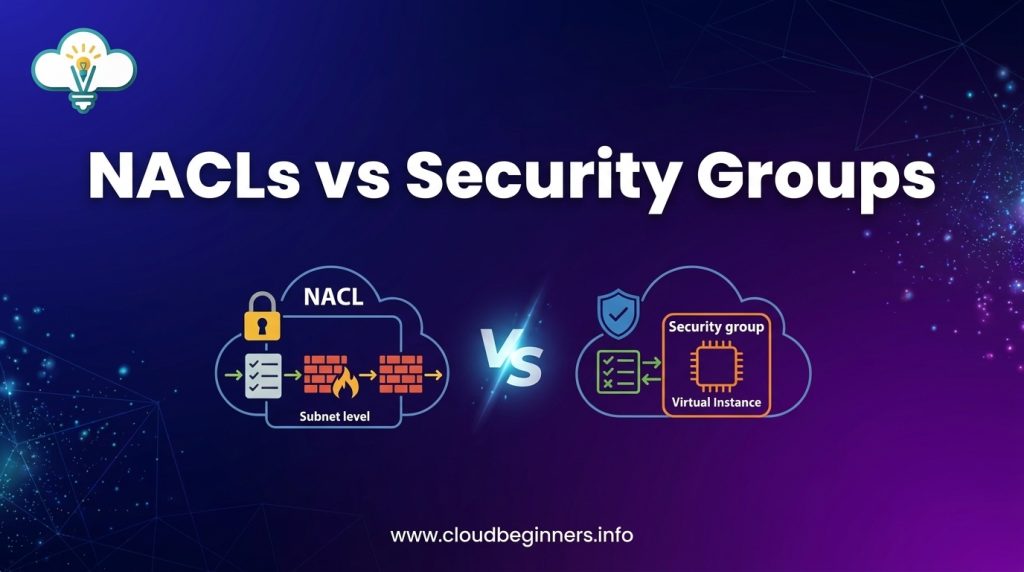
When securing your AWS infrastructure, understanding where your security controls operate makes all the difference. NACLs function at the subnet level, meaning they act as a perimeter defense for an entire subnet. Any traffic entering or leaving the subnet must pass through this checkpoint.
Security Groups, on the other hand, operate directly at the instance level. They wrap around individual EC2 instances, RDS databases, or other AWS resources like a protective shield. This fundamental difference impacts how you design your security architecture.
B. Stateless vs. stateful filtering implications
NACLs are completely stateless – they have no memory of previous packets. This means you need to explicitly configure both inbound and outbound rules. If you allow traffic in on port 80, you’ll also need a separate rule to allow the response traffic out.
Security Groups make your life easier by being stateful. When you allow inbound traffic, return traffic is automatically permitted, regardless of outbound rules. This drastically reduces the number of rules you need to manage.
C. Rule processing behavior differences
With NACLs, rule number matters – a lot. Rules are processed in numerical order (lowest to highest), and processing stops at the first match. If you place a broad deny rule before a specific allow rule, that specific traffic will never get through.
Security Groups work differently. They evaluate all rules before making a decision, and you can only create allow rules. Traffic is denied by default unless specifically allowed.
D. Performance impact considerations
NACLs typically add minimal overhead to your network traffic since they operate with simple numeric rule processing and are evaluated only at subnet boundaries.
Security Groups require more processing resources as they maintain connection state information. For high-throughput applications, you might notice a slight performance impact, especially with complex rule sets across many instances.
E. Configuration complexity comparison
You’ll find NACLs generally more complicated to configure correctly. The combination of stateless behavior, numbered rules, and explicit deny capabilities creates more opportunities for misconfiguration.
Security Groups offer a simpler configuration experience:
- No rule numbering to manage
- No explicit outbound rules needed for response traffic
- No explicit deny rules to maintain
This table summarizes the key differences:
| Feature | NACLs | Security Groups |
|---|---|---|
| Scope | Subnet level | Instance level |
| State | Stateless | Stateful |
| Rule Processing | Numeric order, first match applied | All rules evaluated |
| Default Action | Customizable (default denies all) | Denies all inbound, allows all outbound |
| Rule Types | Allow and deny rules | Allow rules only |
| Return Traffic | Requires explicit rules | Automatically allowed |
Implementing Defense in Depth with Both Tools
Complementary Security Architecture Designs
Think of your AWS VPC as your home. You wouldn’t rely solely on a front door lock to protect everything inside, right? The same applies to your cloud infrastructure.
By combining NACLs and security groups, you create multiple security barriers that attackers must overcome.
Your first line of defense is NACLs – they act like your neighborhood gate, controlling who enters your street. Behind this, security groups function like your door locks, determining who can access specific rooms.
A solid architecture looks like this:
- NACLs at the subnet level blocking clearly malicious traffic
- Security groups at the instance level allowing only necessary communication
- Different security group configurations for web, application, and database tiers
This layered approach means if one security control fails, others still stand to protect your resources.
Traffic Flow Scenarios and Security Tool Selection
When designing your security architecture, match the tool to the job:
| Scenario | Best Tool | Why |
|---|---|---|
| Block specific IP ranges | NACLs | Stateless filtering works well for blanket blocks |
| Allow DB connections only from app servers | Security Groups | Can reference other security groups |
| Prevent outbound traffic to suspicious countries | NACLs | Easily block large IP ranges |
| Control traffic between microservices | Security Groups | Fine-grained control with less management |
Remember: your web servers need different protection than your databases. Your public-facing resources require stricter controls than internal ones.
Regulatory Compliance Considerations
Your compliance requirements heavily influence how you implement these tools. For PCI DSS, you need clear network segmentation – NACLs help you enforce strict subnet isolation while security groups provide the detailed access controls required for cardholder data environments.
HIPAA compliance? You’ll need to demonstrate both network-level controls (NACLs) and application-level protections (security groups) to show proper PHI protection.
Document your defense-in-depth strategy carefully – auditors love seeing how NACLs and security groups work together to create demonstrable security boundaries.
Monitoring and Auditing Capabilities
You can’t secure what you can’t see. Set up VPC Flow Logs to capture all network traffic passing through your NACLs. This gives you detailed records of accepted and rejected packets – crucial for both troubleshooting and security investigations.
For security groups, CloudTrail logs any configuration changes, helping you track who modified access rules and when. CloudWatch can alert you to suspicious traffic patterns that might indicate a breach.
Consider implementing AWS Config Rules to continuously evaluate your security posture and ensure both your NACLs and security groups maintain compliance with your security policies.
By combining these monitoring approaches, you get full visibility across all security layers – from broad network controls to instance-specific protections.
Real-World Implementation Strategies
E-commerce Platform Security Architecture
Setting up your e-commerce platform on AWS requires careful security planning. You’ll need multiple layers of protection to safeguard customer data and transactions.
Start by creating separate subnets for your web, application, and database tiers. For your customer-facing web tier, configure security groups to allow only HTTP/HTTPS traffic (ports 80/443) from the internet. Your NACLs should block all other inbound traffic while allowing return traffic through ephemeral ports.
For your application tier, security groups should permit traffic only from the web tier on specific application ports. The database tier should accept connections exclusively from the application tier on the database port (e.g., 3306 for MySQL).
Here’s a practical implementation:
| Layer | Security Groups | NACLs |
|---|---|---|
| Web Tier | Allow 80/443 inbound from 0.0.0.0/0 | Block all except 80/443 inbound, allow ephemeral outbound |
| App Tier | Allow specific ports only from Web Tier SG | Deny all except from Web Tier CIDR |
| DB Tier | Allow DB port only from App Tier SG | Deny all except from App Tier CIDR |
Multi-tier Application Protection Examples
When protecting your multi-tier applications, think about security from the outside in.
For a typical three-tier web app, your public-facing load balancer should sit in a public subnet with security groups allowing only HTTP/HTTPS traffic.
Behind this, your application servers belong in private subnets with security groups permitting only traffic from the load balancer security group.
A real-world example you might implement:
- Front-end web servers: Place in private subnets with security groups allowing traffic only from the load balancer and outbound to the application tier
- Application servers: Configure security groups to accept connections only from the web tier security group
- Database servers: Lock down with security groups that permit only application tier connections
Use NACLs as your perimeter defense, blocking known malicious IP ranges and implementing coarse-grained subnet-level rules.
How to Troubleshoot Security Issues Effectively
When your app suddenly stops working, security configurations are often the culprit. You need a systematic approach to troubleshoot.
Start by checking security group rules – they’re often the source of connectivity issues. Use the AWS Console to verify inbound and outbound rules on all relevant security groups.
If security groups look correct, examine your NACLs next. Remember their stateless nature means you need matching inbound and outbound rules. Check rule numbers carefully – a higher priority rule might be blocking your traffic.
Still stuck? Flow logs are your best friend. Enable VPC flow logs and analyze them to see exactly what traffic is being allowed or denied:
aws ec2 create-flow-logs --resource-type VPC --resource-id vpc-1234abcd --traffic-type ALL --log-destination arn:aws:logs:region:account-id:log-group:name
Use CloudWatch Logs Insights to query your flow logs and identify rejected packets. Look for REJECT entries to pinpoint exactly where traffic is being blocked.
Automating Security Configurations with Infrastructure as Code
Manual security configurations lead to errors and inconsistency. You’ll save countless hours by automating your AWS security setup with Infrastructure as Code (IaC).
AWS CloudFormation lets you define your entire security architecture in a template file. For example, to create a security group with specific rules:
WebServerSecurityGroup:
Type: AWS::EC2::SecurityGroup
Properties:
GroupDescription: Allow HTTP/HTTPS
SecurityGroupIngress:
- IpProtocol: tcp
FromPort: 80
ToPort: 80
CidrIp: 0.0.0.0/0
- IpProtocol: tcp
FromPort: 443
ToPort: 443
CidrIp: 0.0.0.0/0
Terraform offers similar capabilities with a more cloud-agnostic approach. Use it to maintain consistent security across environments:
resource "aws_security_group" "web" {
name        = "web-sg"
description = "Web tier security group"
ingress {
from_port   = 80
to_port     = 80
protocol    = "tcp"
cidr_blocks = ["0.0.0.0/0"]
}
}
For more dynamic environments, consider AWS CDK to define infrastructure using familiar programming languages like Python or TypeScript.
Choosing the right security tools for your AWS Virtual Private Cloud is crucial for maintaining a robust defense system.
Network Access Control Lists provide stateless, subnet-level protection that works effectively as your first line of defense, while Security Groups offer stateful, instance-level security that precisely controls traffic flow to your resources.
Understanding their distinct capabilities allows you to implement them strategically within your architecture.
For optimal VPC security, implement a defense-in-depth approach by using both tools together. Apply broad traffic filtering with NACLs at your subnet boundaries, then refine access control with Security Groups at the instance level.
This layered security strategy provides comprehensive protection against increasingly sophisticated threats while maintaining the performance and accessibility your applications require.
I’ve also built a platform that shows you how to build the right hands-on cybersecurity skills to help businesses achieve their cloud security goals while you build the career you love for a better, higher-paying reward. Check it out here and start working on projects that will help you get hired.
The Author